Grow
Every offer’s status, your stock in sync.
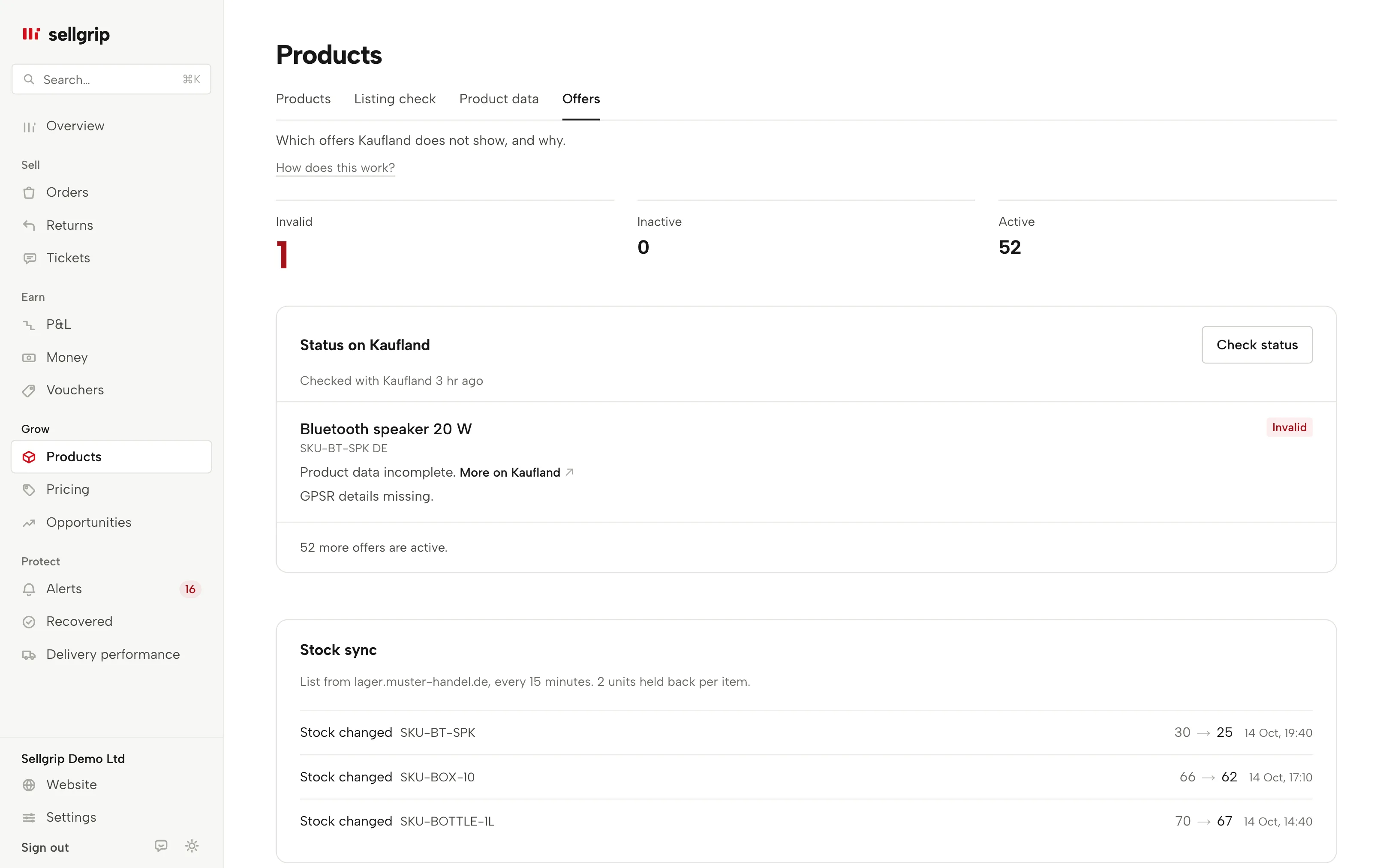
Sellgrip shows which offers Kaufland does not show, with Kaufland’s reason. If you switch on the stock sync, it sets your stock at Kaufland from your own list.
No payment details, no minimum term.
What Offers shows
Three states
Active, inactive or invalid, the way Kaufland itself tells them apart. The counts sit at the top, invalid first.
Kaufland’s reason
Every offer that is not active carries Kaufland’s reason, such as missing product data. A link leads to more on Kaufland.
Check status
One click asks Kaufland for the current status of all your offers. Sellgrip shows when it last asked.
Stock from your list
A CSV file or the address of your stock list, matched by EAN or SKU. Sellgrip never sets more stock than the list says.
Reserve per item
Hold back units on every offer, or per item through a reserve column. An empty cell keeps your general reserve.
Every 15 minutes
With an address, Sellgrip fetches the list after each sync with Kaufland, every 15 to 1,440 minutes. Rows without a country count for every country you sell the product in.
How the stock sync works
-
Switch it on
A dialog says exactly what will happen. You choose EAN or SKU, your reserve and how often Sellgrip fetches the list.
-
Sellgrip checks the list
If the list has an error or too many offers would change at once, Sellgrip sends nothing. The limit is 30% of your offers unless you set another.
-
Kaufland gets the stock
Only the quantity changes, offer by offer. Every change is in the history, and the emergency stop on Pricing rules ends it at once.
What you see in Sellgrip
- Status on Kaufland
- The offers that are not active, with their reasons and the country if you sell in several.
- Stock sync
- Off, or on since a date with its matching and limit; with an address, also where from and how often.
- Upload
- Check first: what changes, what stays and which rows match no offer. Then update Kaufland.
- History
- The latest stock changes, stops and restarts, each with time and reason.
Questions about Offers
Does Sellgrip change my stock on its own?
Only once you switch the stock sync on, and then within your limits. Without it, you change stock on Products or in the Seller Portal.
What happens if the list has an error?
Sellgrip sends nothing and names the rows. If Kaufland refuses three changes in a row, the sync switches itself off.
How current is the status?
Sellgrip reads it once a day after the sync. With “Check status” you ask yourself, at most every five minutes.
Who can switch the sync on?
With Pro or Business, logins that may take actions. Someone with read-only access sees the status without the buttons.
Related tools
- Kaufland Smart Pricing: how to set a minimum price Guide
- Sell on Kaufland: the 2026 guide for international sellers Guide
- The Kaufland Seller Portal explained, step by step Guide
Last updated
Start with Sellgrip today.
Try Business free for 14 days, without payment details or a contract. The 14 days start once your shop is connected. After that, choose a plan or carry on with Free.