Protect
New Kaufland rules, with what you need to do.
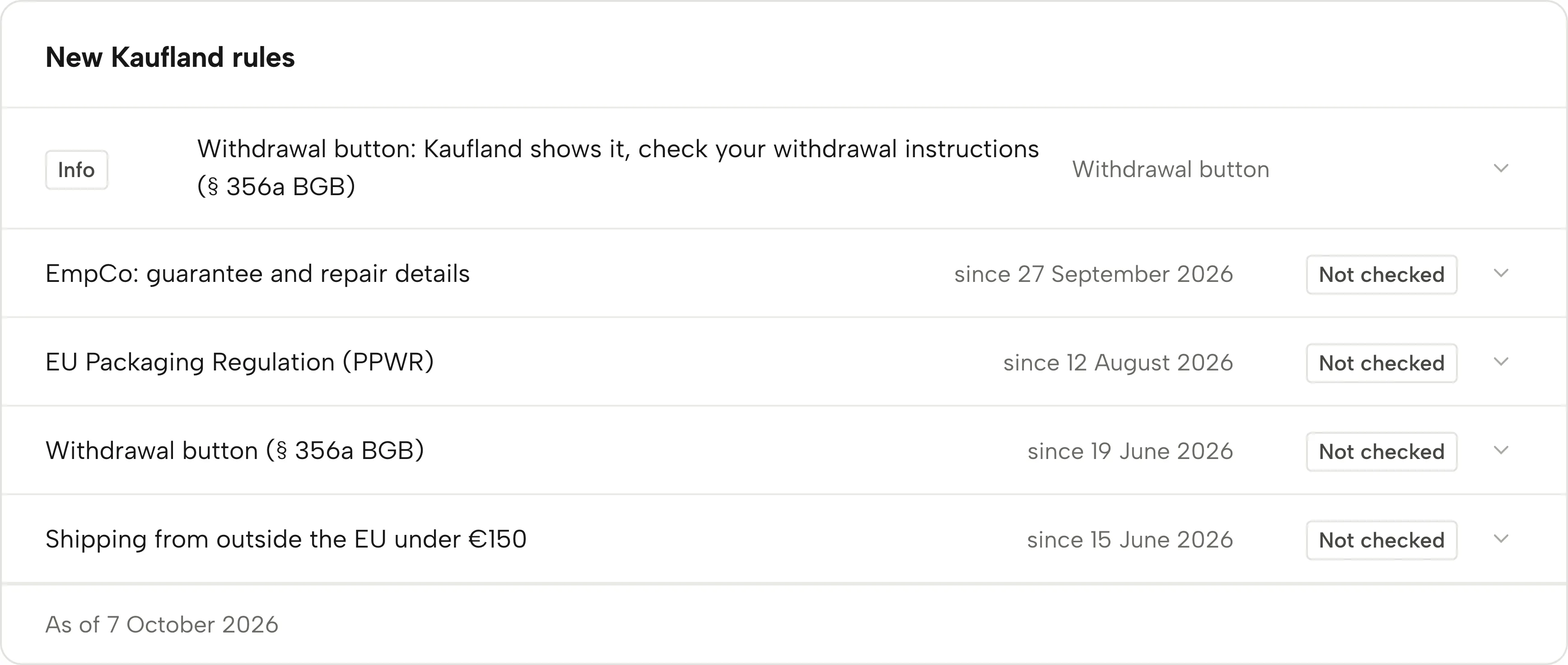
New requirements come with a date. The rules calendar shows each rule for the countries you sell in, with its status: ready, action needed or not checked.
No payment details, no minimum term.
What the calendar tracks
Rules per country
22 rules from Kaufland’s Seller University and the law: packaging (PPWR, LUCID, EPR per country), product safety (GPSR), batteries, WEEE, DAC7, VAT ID, legal texts and more. You only see the rules for the Kaufland storefronts you sell on.
Return option in the first reply
Required for return requests since 1 February 2026. If a return ticket is waiting for a return option, the rule shows “Action needed”.
Withdrawal button under § 356a BGB
Since 19 June 2026 Kaufland itself shows the “Vertrag widerrufen” button on Kaufland.de. You bring your withdrawal instructions up to date, check that it appears on your offers, and handle incoming withdrawals.
One case per return ticket
Every open return ticket appears as its own case in Alerts. The 48-hour deadline runs alongside.
The rule, one click away
Clicking a rule shows what it requires and what you do, with its source, Kaufland’s page or the law, and the day we read it.
Kept up to date
We read the Kaufland pages behind the rules every day. When one changes, we check the rule and update it where needed. Under the calendar, “As of” shows the day of the last check.
How you use the calendar
-
Read the status
Each rule is at the top of Alerts with its date and status. “Ready” means nothing is waiting for you.
-
Answer return tickets
With Business, every return ticket comes with a draft reply that includes a return option. You copy it into your reply.
-
Check your withdrawal instructions
Bring your withdrawal instructions in the Seller Portal up to date, check on one offer that “Vertrag widerrufen” appears, and click “Mark as reviewed” in Sellgrip. It then switches to “Ready”.
-
Check the other rules
Rules that Sellgrip cannot see in your Kaufland data show “Not checked”. Open each one and read what to do. Then check it yourself in the Seller Portal.
What the rules require
Reply to a return request without a valid return option, and you lose the order. Kaufland cancels it and refunds the buyer the full purchase price.
A return address alone is only enough up to €40 in goods value. Above that, you need a prepaid return label, for example.
- Valid return options
- A prepaid return label or a link to download one. Also your return address up to €40 in goods value, or a refund without a return.
- Reply within 48 hours
- Kaufland expects a reply to every ticket within 48 hours on working days.
- Withdrawal function
- § 356a BGB requires a function that lets consumers declare withdrawal from online contracts. On Kaufland.de, Kaufland provides it itself (“Vertrag widerrufen” under Hilfe & Kontakt). The withdrawal instructions and handling withdrawals on time stay with you. If you also run your own online shop, it needs its own button.
Sources: Kaufland Seller University, Customer enquiries; § 356a BGB (German Civil Code), read on 11 September 2026; onlinehandelsrecht.com, Der Widerrufsbutton ist da, read on 7 October 2026.
What you see in Sellgrip
- New Kaufland rules
- A panel in Alerts called “New Kaufland rules”, with one line per rule: its name, the date it has applied from and its status.
- Ready, action needed, not checked
- “Ready” means nothing is waiting. “Action needed” means a ticket needs a return option. “Not checked” means Sellgrip cannot see it in your Kaufland data. You mark the withdrawal button as reviewed once you have checked it.
- Return option
- The case for a return ticket among the open cases, labelled “Return option”, with “Return ticket” and the ticket number in its title.
- Evidence file for the ticket
- For a return ticket, Business lets you download an evidence file with the ticket history.
- Source and date
- Every rule links to its source and names the day we read it. Rules without a start date are marked “ongoing”.
- On the overview
- When a rule still needs your check, the overview shows it under “Rules and deadlines”, with “Mark as reviewed” and a link to “All rules”.
Questions about Rules calendar
Which rules does the calendar cover?
22 rules, each with its source at Kaufland or in the law and the day we read it. Among them EmpCo, the Packaging Regulation (PPWR), GPSR, the Battery Regulation, LUCID, WEEE, DAC7, the return option, the withdrawal button and more. You only see the rules for the countries you sell in. We check Kaufland’s pages every day for changes.
How does Sellgrip know whether I am ready?
For the return option, from your open return tickets. For the withdrawal button, from you marking it as reviewed: Kaufland shows the button, you check your withdrawal instructions and your offers yourself. Sellgrip cannot see the other rules in your Kaufland data. They show “Not checked”, and you check them yourself in the Seller Portal.
What counts as a valid return option?
A prepaid label, a link to the label, a refund without a return, or your address up to €40 in goods value. That is how Kaufland’s Seller University puts it.
What happens if the first reply has no return option?
Kaufland cancels the order and refunds the buyer the purchase price, at your expense. That is why the draft reply in Sellgrip names the €40 limit.
Does the calendar cost extra?
No, it is on every plan. The ready draft reply for a return ticket comes with Business.
Does the 48-hour deadline apply to return tickets too?
Yes. The case shows how many hours the ticket has gone unanswered.
Related tools
Checked on , last updated
Start with Sellgrip today.
You can start free without a card or a contract. Want everything? Try Business for 14 days (payment details required). After that you pay for the plan you chose, plus VAT, unless you cancel first.