Sell
Returns tool for Kaufland: which products come back, and why.
Sellgrip breaks down your Kaufland returns by product and by reason. At the top are the returns waiting for your decision.
No payment details, no minimum term.
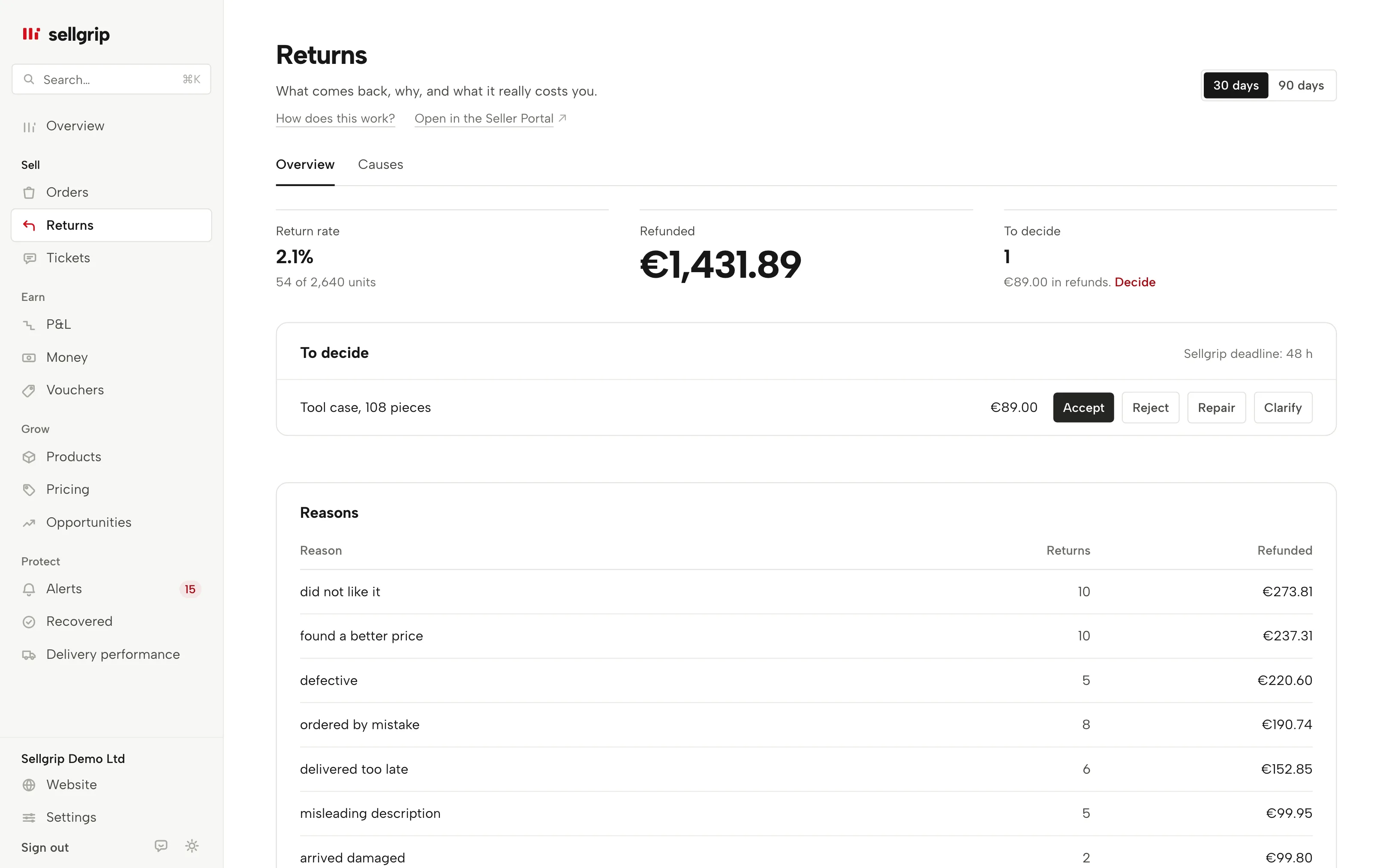
What the returns page shows
Return rate
The share of units that came back in the chosen period, measured against everything sold in that time.
Refunded
The total of the known refund amounts for these returns. If an amount is missing, Sellgrip counts the return beside the total instead of adding a zero.
Reasons
Kaufland’s return reason for each return: defective, did not like it, wrong size and others. For each reason you see the count and the amount.
By item
Sold, returns, rate, refunded and main reason for up to 15 products, the costliest first. That is how you find the product that costs you most.
To decide
Returns that have arrived and are waiting for you, with the amount and the Sellgrip deadline. You decide with Return decisions on Pro and Business.
Causes
The second tab on the Returns page is the Returns radar: which products come back clearly more often than the rest of your shop, why, and what to check. On Pro and Business.
How you use the breakdown
-
Sellgrip reads your returns
At every sync, the status, reason and product of every return come from the Kaufland Seller API.
-
You pick the period
The figures cover returns created in that period. Open decisions always count, however old they are.
-
You check the product
When one reason keeps coming up for a product, you see it on one row. Then it is worth checking the description, photos or size details.
What a return costs, and what Kaufland asks
A return costs more than the refund. Depending on the case, return shipping and inspection come on top, and not every item can be sold again.
The returns page shows which products these costs come from. It uses only your own Kaufland data to do so.
Many returns start as a ticket. A fixed rule has applied to your first reply since 1 February 2026.
The return cost calculator works out what one return costs you, without an account.
- A return option straight away
- Reply to a return request with a valid option right away. Otherwise Kaufland cancels the order and refunds the buyer the full price.
- Address only up to €40
- Your return address alone is enough up to €40 in goods value; above that you need something like a prepaid label. The Rules calendar shows open cases.
Source: Kaufland Seller University, Customer enquiries, read on 11 September 2026.
What you see in Sellgrip
- Return rate
- Large at the top under “Return rate”, with how many units out of how many came back.
- Refunded
- Under “Refunded”, the total for the period. Returns without an amount or without a date appear as a note below it.
- To decide
- Under “To decide”, the number of open returns and the refund at stake. The “Decide” link goes to the list on the same page.
- Reasons and by item
- Two tables, “Reasons” and “By item”, sorted by amount. A reason Sellgrip does not know shows as Kaufland’s own wording, untranslated.
- Period
- 30 or 90 days, chosen at the top right. It applies to the rate, the refunds, the reasons, the table by item and the “Causes” tab, not to the open decisions.
- Returns on the order
- Each order shows its returns with Kaufland’s steps and the buyer’s return parcel. There you can also start a return for a buyer who contacted you directly, or add an item to an open return, with Return decisions.
Questions about Returns
How does Sellgrip calculate the return rate?
Returns in the period divided by units sold plus units returned. A rejected return counts as a sale that stayed.
Why does it say “without amount” next to the total?
Sellgrip knows no refund amount for those returns. They are counted, but not added as €0.
Why are some returns missing from the rate?
A return without a date fits no period. Sellgrip counts it separately and shows the number under “Refunded”.
Can I accept or reject returns here?
Yes, with Pro or Business, straight from the “To decide” list. On an order you can also start a return yourself. On the Free plan, the row says which plan does this.
Does the breakdown cost extra?
No, you see rate, reasons and products on every plan. Only deciding needs Pro or Business.
Which Kaufland countries does this cover?
Returns in all nine Kaufland countries, including Spain. On this page, refunds in koruna and złoty are converted to euros at the ECB rate of their day. The “Causes” tab keeps each currency separate.
Related tools
- Kaufland returns: deadlines, costs and rejecting a return Guide
- Return cost calculator Free calculator
- Returns radar Sellgrip tool
- Return decisions Sellgrip tool
Checked on , last updated
Start with Sellgrip today.
You can start free without a card or a contract. Want everything? Try Business for 14 days (payment details required). After that you pay for the plan you chose, plus VAT, unless you cancel first.