Protect
Your Kaufland metrics, before a fee applies.
Kaufland only judges your cancellation rate once the month is over. Sellgrip keeps calculating it over the last 30 days, along with ticket rate and late shipments.
No payment details, no minimum term.
Which metrics Sellgrip calculates
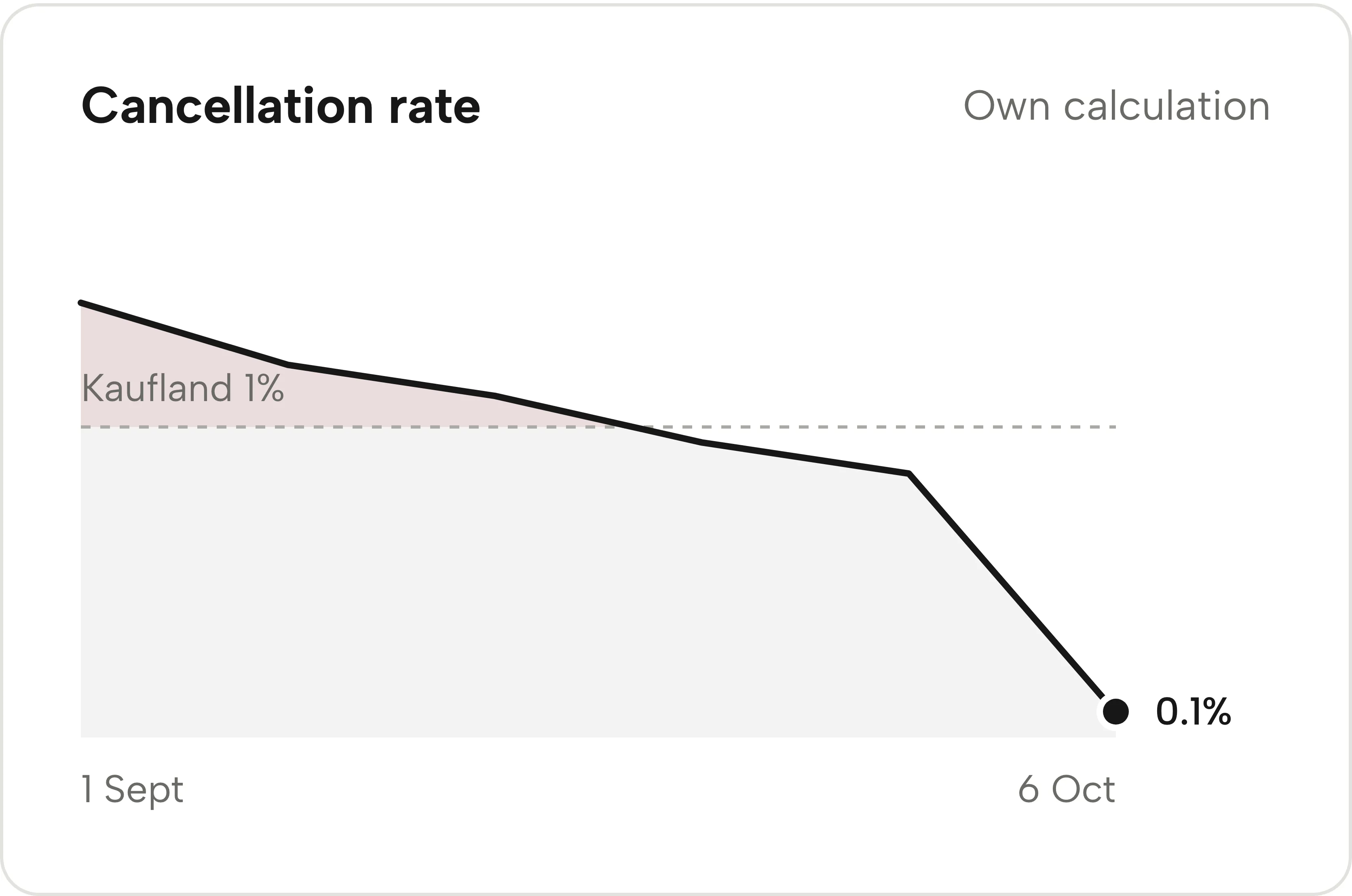
Cancellation rate
Seller-related cancellations as a share of your orders in the last 30 days. Cancellations by buyers do not count.
Ticket rate
New tickets as a share of your orders in the last 30 days. Shown with the weekly trend.
Late shipments
Orders that missed their shipping deadline, as a share of all orders with a deadline. Early warning and the evidence file use this rate.
Kaufland’s own figure
The rate for the last completed month, from Kaufland’s cancellation report. If the report is missing, Sellgrip says so and does not fill in a number of its own.
Where the numbers come from
-
Data from the API
Sellgrip reads orders and tickets through the Kaufland Seller API. Kaufland’s own metrics are not available through the API.
-
One data point a day
After the sync, Sellgrip stores the rates for the last 30 days, at most once a day. It starts at 20 orders in 30 days.
-
The trend builds up
The data points form a line that shows where a rate is heading. The line at 1% is Kaufland’s target for the cancellation rate.
Why 1% matters on Kaufland
Kaufland judges the seller-related cancellation rate per calendar month. Once the month is over, nothing about the rate can change.
Sellgrip’s 30 days move as soon as something goes wrong. They are an early indicator, not the figure Kaufland charges on.
- Cancellation rate under 1%
- Kaufland expects fewer than 1% seller-related cancellations per month, counted over the items ordered in the last completed month.
- Fee from 1%
- Between 1% and 2.99%, Kaufland charges 7% of the total price of the cancelled transactions; over 3% it is 15%. Check it with the cancellation rate calculator.
- Tickets and ticket rate
- Tickets must be answered within 48 hours on working days. Kaufland sets no target for the ticket rate across all tickets; for the adjusted seller-related ticket rate it expects less than 1%.
Sources: Kaufland Seller University, Customer service KPIs; Kaufland Seller University, Order management, read on 11 September 2026.
Where you see the metrics
- Overview
- The trend of your cancellation rate with a line at 1%, on every plan.
- Alerts
- From 1%, the cancellation rate appears in Alerts as a case with the possible fee. If cancellations lack a reason, Sellgrip shows a range.
- Account health
- When early warning finds an account risk, the “Account health” panel appears at the top of Alerts. It shows the ticket rate with its trend, Kaufland’s figure for last month and the trend line.
- A source beside every limit
- Each line says whether it comes from Kaufland or is Sellgrip’s own benchmark. The 10% for the ticket rate, for example, is Sellgrip’s benchmark and not a Kaufland limit.
- Delivery performance
- Delivery performance shows late shipments in more detail, with cancellations and tracking numbers, per period and per country. On every plan.
Questions about Account metrics
Are these the same numbers as in the Seller Portal?
Not necessarily. Sellgrip calculates them itself from order and ticket data, so the Seller Portal can show different values.
Why don’t I see any metrics yet?
Sellgrip starts at 20 orders in 30 days. Until then, it says that data is still being collected.
Why does Sellgrip show a range for the cancellation rate?
For some cancellations, Kaufland gives no reason. They form the top of the range, but they are not counted against you.
Why does Kaufland’s figure say “cannot be calculated”?
Sellgrip uses Kaufland’s cancellation report for last month. If it is missing, Sellgrip names the reason and does not fill in a number of its own.
Does Kaufland block my account at a certain rate?
Kaufland does not publish a rate at which offers are hidden. So Sellgrip never predicts a block.
Related tools
- What does a cancellation rate above 1% cost? Guide
- Cancellation rate calculator Free calculator
- Early warning Sellgrip tool
- Delivery performance Sellgrip tool
- Customer service Sellgrip tool
Checked on , last updated
Start with Sellgrip today.
You can start free without a card or a contract. Want everything? Try Business for 14 days (payment details required). After that you pay for the plan you chose, plus VAT, unless you cancel first.