Grow
Who offers your products, and what changed since yesterday.
Once a day Sellgrip takes a snapshot of the offers on your items and compares it with yesterday’s, so you see what has changed.
Try Pro or Business free for 14 days, then pay monthly or yearly for the plan you chose, plus VAT, unless you cancel first.
What the radar reports
What moved
A competitor raised or lowered their price, a new one appeared, one left, or the Buy Box changed hands. If a seller is gone, the radar says whether they are probably sold out or dropped out of the first ten.
Where you are asking too little
If you are the cheapest by a margin, Sellgrip names the price at which you still would be, with your floor beside it.
And where to do nothing
If you hold the Buy Box, or the price needed sits below your floor, Sellgrip says so just as plainly. Not every Buy Box is worth it.
Who keeps undercutting you
A seller who has undercut you three times or more on a product is named, so you know who keeps doing it.
How the report is built
-
One snapshot a day
Kaufland returns at most ten offers per product. Sellgrip stores them and keeps the last capture of each day.
-
Compared with yesterday
Two snapshots make a movement: lowered, raised, appeared, gone, Buy Box changed hands.
-
A suggestion against your costs
A price suggestion appears only when purchase price, commission and fixed fee are known. If one is missing, Sellgrip makes no suggestion.
No suggestion without a floor
A repricer that only watches other people’s prices will eventually take you below your costs. Sellgrip checks every suggestion against purchase price, commission and fee, and names the floor on the same line. The floor is your break-even, or your own minimum price if that is higher.
If one of those figures is missing, Sellgrip refuses the suggestion rather than treating it as zero. A floor built on a missing fee sits below the real one.
- Top ten
- Kaufland returns at most ten offers per product. If a seller disappears from a full list, the message says they dropped out of the first ten. If the list was not full, they are probably sold out or paused.
- One reading a day
- A seller who changes price twice in a day shows as one movement. The radar is not a live feed. With many products, your best sellers come first each day and the rest take turns.
What you see in Sellgrip
- Undercut
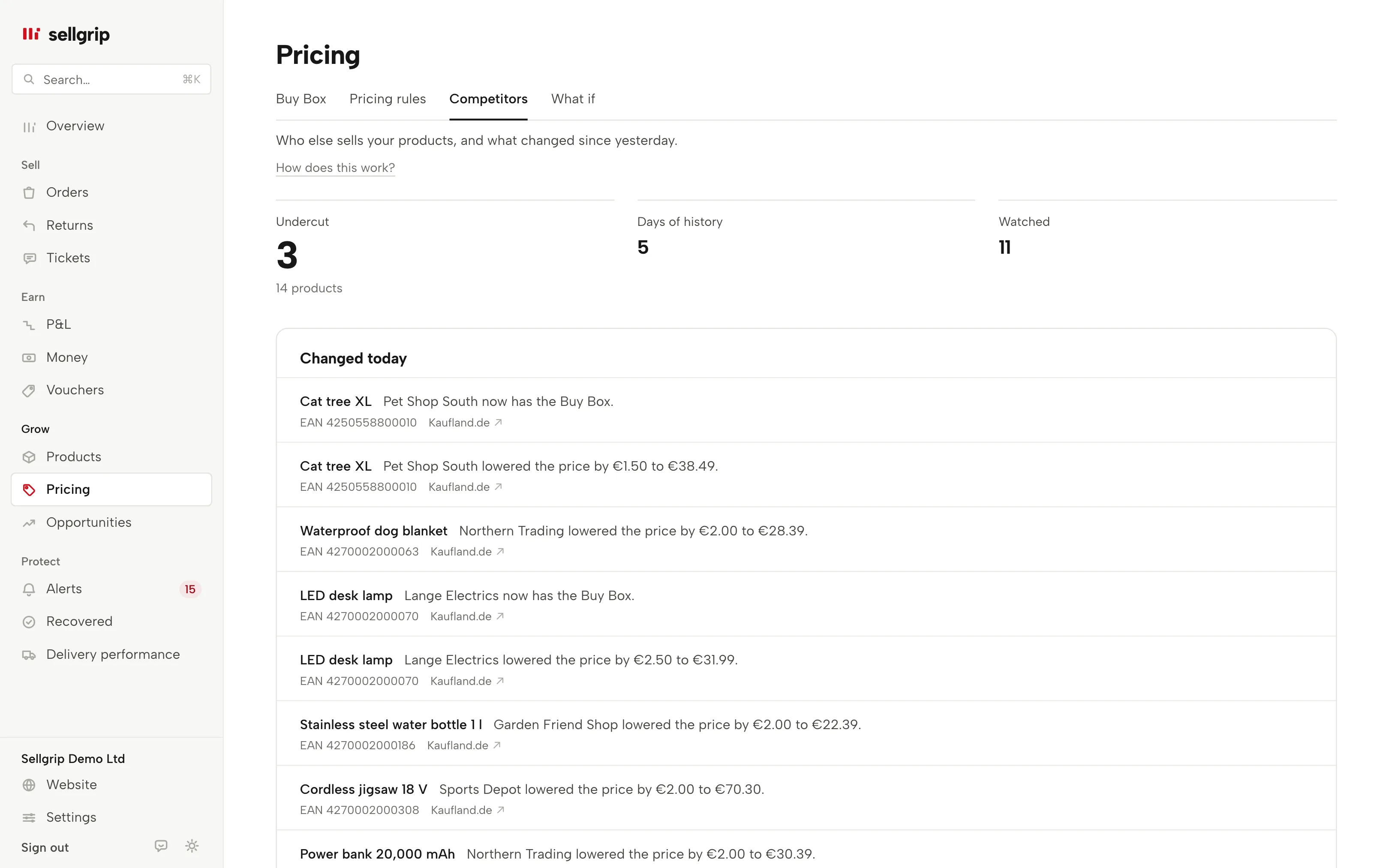
- At the top: on how many of your products someone sells for less than you today, the days of history and the number of sellers watched.
- Suggestions
- Where you could raise the price, where the Buy Box is in reach above your floor, and who keeps undercutting you. Each with the suggested price and your floor. The same cases appear in Alerts.
- Competitors
- Every seller seen on your products, with a link to their shop on Kaufland: on how many of your products they appear, where they are listed now and where they are cheaper than you today.
- Changed today
- The day’s movements, with the old and the new price. The product name opens it under Products, the country opens it on Kaufland.
- No suggestion
- Why a product has no suggestion, such as an unknown break-even or a missing shipping price, with the products it concerns. Where costs are missing, a link takes you to enter them.
Questions about Competitor radar
Does Sellgrip change my prices automatically?
Not from the radar. It works out and suggests; you change the price with a click under Products. Automatic pricing within your limits is part of Pricing rules and is being switched on account by account.
How often is it measured?
Once a day. A competitor who changes price twice in a day shows as one movement.
Why is there no suggestion on some products?
Because a purchase price, commission or fixed fee is missing. Sellgrip then does not treat it as zero; it says what is missing.
What does “gone from the top ten” mean?
Kaufland returns at most ten offers per product. A seller who slips to eleventh is no longer visible to the radar.
What about used or refurbished offers?
Kaufland ranks each condition separately. The radar reads the ranking for the condition your offer is in, so a used offer is compared with used offers.
Which plan includes the radar?
Business only. You can try it during the 14-day Business trial.
Related tools
Last updated
Start with Sellgrip today.
You can start free without a card or a contract. Want everything? Try Business for 14 days (payment details required). After that you pay for the plan you chose, plus VAT, unless you cancel first.