Grow
Which of your supplier’s items pay off on Kaufland.
Sellgrip reads your purchase list and checks each line against the Kaufland data it already holds for your account. What Sellgrip does not know is shown as unknown.
Try Pro or Business free for 14 days, then pay monthly or yearly for the plan you chose, plus VAT, unless you cancel first.
What the margin finder works out
Margin per item
Your purchase price against the Kaufland price, less your category commission and the marketplace’s fixed fee.
Ranked step by step
Items above your threshold come first. Then Kaufland’s demand, the sales rank and the number of offers decide the order, and only then the margin itself. No score: you can repeat every step yourself.
With a reason and a risk
Every line says why it sits high or low, and notes what to check first, such as manufacturer details under GPSR, a category Kaufland has to approve, CE marking, WEEE or batteries.
Demand next to the margin
Kaufland’s demand level and the number of offers stand on every line. After an upload, Sellgrip asks Kaufland for fresh demand data at the next sync, so new EANs do not wait for the daily round.
In three steps
-
Upload the list
As a CSV, the way Excel or your stock system saves it. Sellgrip works out the character set, the separator and the decimal mark itself, and flags EANs that Excel cut to scientific notation instead of guessing them. Files up to 10 MB. If the file does not say the currency, net or gross, per unit or per pack, or the decimal mark, Sellgrip asks under “What we read” and you click “Re-import”.
-
Sellgrip matches
Each line is matched on its EAN against what Kaufland reports for that product. A line without a match is shown as not found, not as zero euros.
-
Set a threshold and act
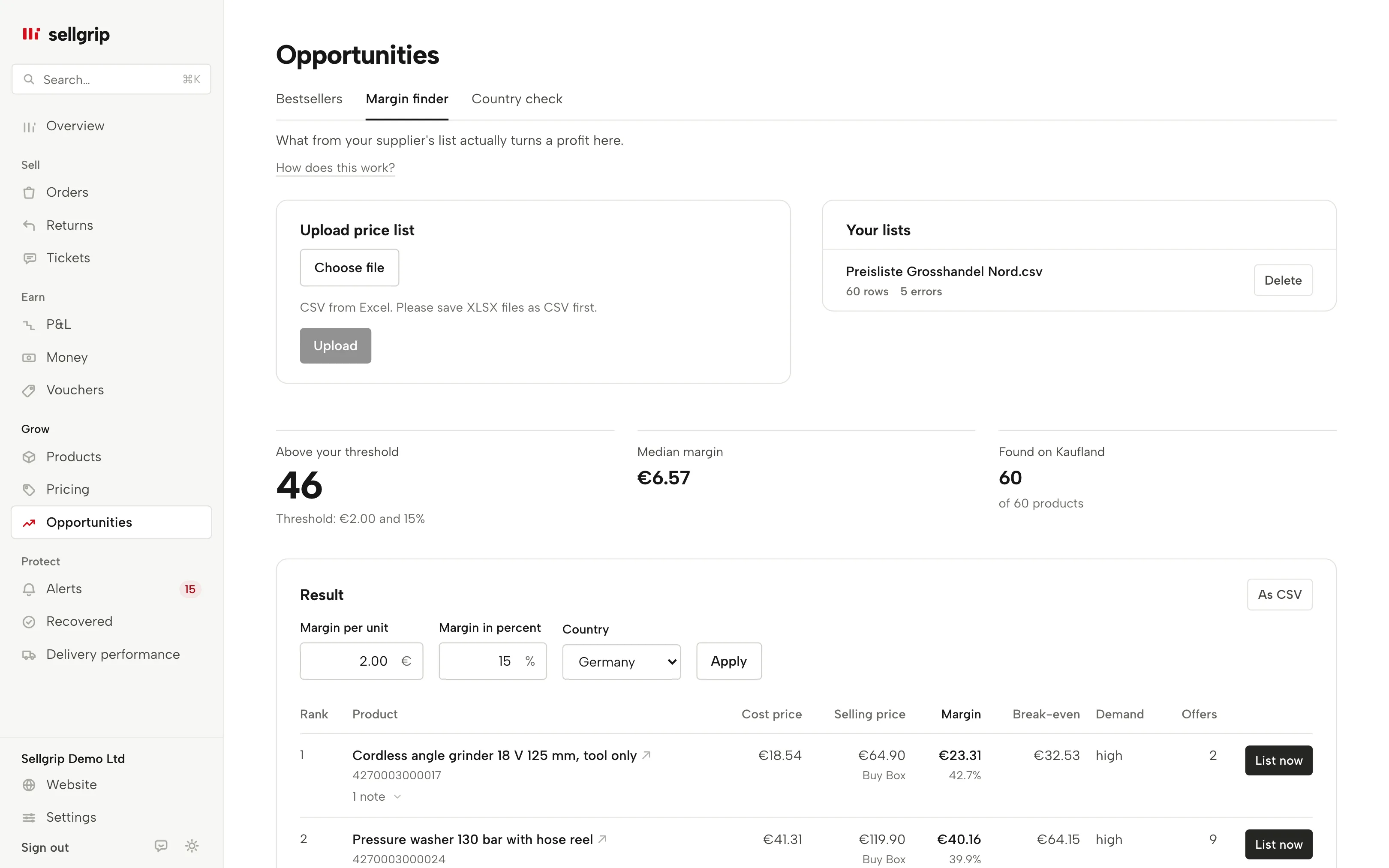
Set the margin, in euros and as a percentage, above which an item is worth listing. Items that clear the threshold and that you do not list yet can go straight onto Kaufland with “List now”, or to your purchasing as a CSV.
A price list is a trade secret
An uploaded list is yours, is stored separately per seller account and is read only for your own analysis. Sellgrip deletes the file itself after 30 days, and the imported rows once you have not opened the list for a year.
The margin finder does not invent a Kaufland price. If nothing is known about an item, it appears under “Not found on Kaufland” instead of sitting in the ranking on a guessed margin.
- With shipping, where known
- For items you already list, Sellgrip uses your shipping cost per unit, for new items the shipping you entered in the country check for the country you choose. Otherwise it is the margin before shipping, and the line says so.
- Koruna and złoty
- Sellgrip converts purchase prices in koruna or złoty to euros at the ECB rate, and margins in Czechia and Poland are shown in the local currency. Without a rate a row gets no margin.
What you work with in Sellgrip
- Lists side by side
- Several suppliers, each list analysed on its own, with its upload date. “Delete” removes a list.
- Threshold and country
- “Margin per unit”, “Margin in percent” and the Kaufland country to check. Above the result: how many items are “Above your threshold”, the “Median margin” and how many were “Found on Kaufland”.
- Four groups
- Every line is “Above threshold”, “Below threshold”, “Loss” or “Unknown”. Items Kaufland knows nothing about are under “Not found on Kaufland”, rows Sellgrip could not read under “Unreadable rows”.
- Lines with a warning
- Missing manufacturer details under GPSR, categories that need approval, CE marking, WEEE, batteries, branded goods and prices older than a week appear as a note on the line.
- List now and export
- “List now” on every worthwhile line you do not list yet, with a suggested price just below the Buy Box. “As CSV” downloads the filtered list with margin, reason and Kaufland price, with headings in your language.
Questions about Margin finder
Which file formats can I upload?
CSV, in UTF-8, UTF-16 or Windows-1252 from older stock systems. Save an .xlsx or .xls file as CSV in Excel first.
Why do some items have no margin?
Because Kaufland reports nothing for that EAN, the purchase price is in another currency, or your category commission has not been looked up yet. The line states which.
Can anyone else see my purchase prices?
No. The list is stored separately per seller account, and Sellgrip deletes the uploaded file after 30 days.
Is shipping included?
For items you list, with your shipping figure, for new items with the shipping you entered in the country check for the chosen country. Otherwise it is the margin before shipping.
Can I list an item from the list straight away?
Yes, with “List now”: Sellgrip suggests a price just below the Buy Box and only lists below the break-even from your supplier list if you confirm. If you like, Sellgrip sets the minimum price to that break-even.
Which plan includes the margin finder?
Business. The margin finder is also in the 14-day Business trial.
Related tools
Last updated
Start with Sellgrip today.
You can start free without a card or a contract. Want everything? Try Business for 14 days (payment details required). After that you pay for the plan you chose, plus VAT, unless you cancel first.