Protect
Every resolved difference, with proof.
When a case from Alerts is closed, Sellgrip books its amount under Recovered or Prevented. You see both for the last 30 days.
Try Pro or Business free for 14 days, then pay monthly or yearly for the plan you chose, plus VAT, unless you cancel first.
What Recovered records
Two totals
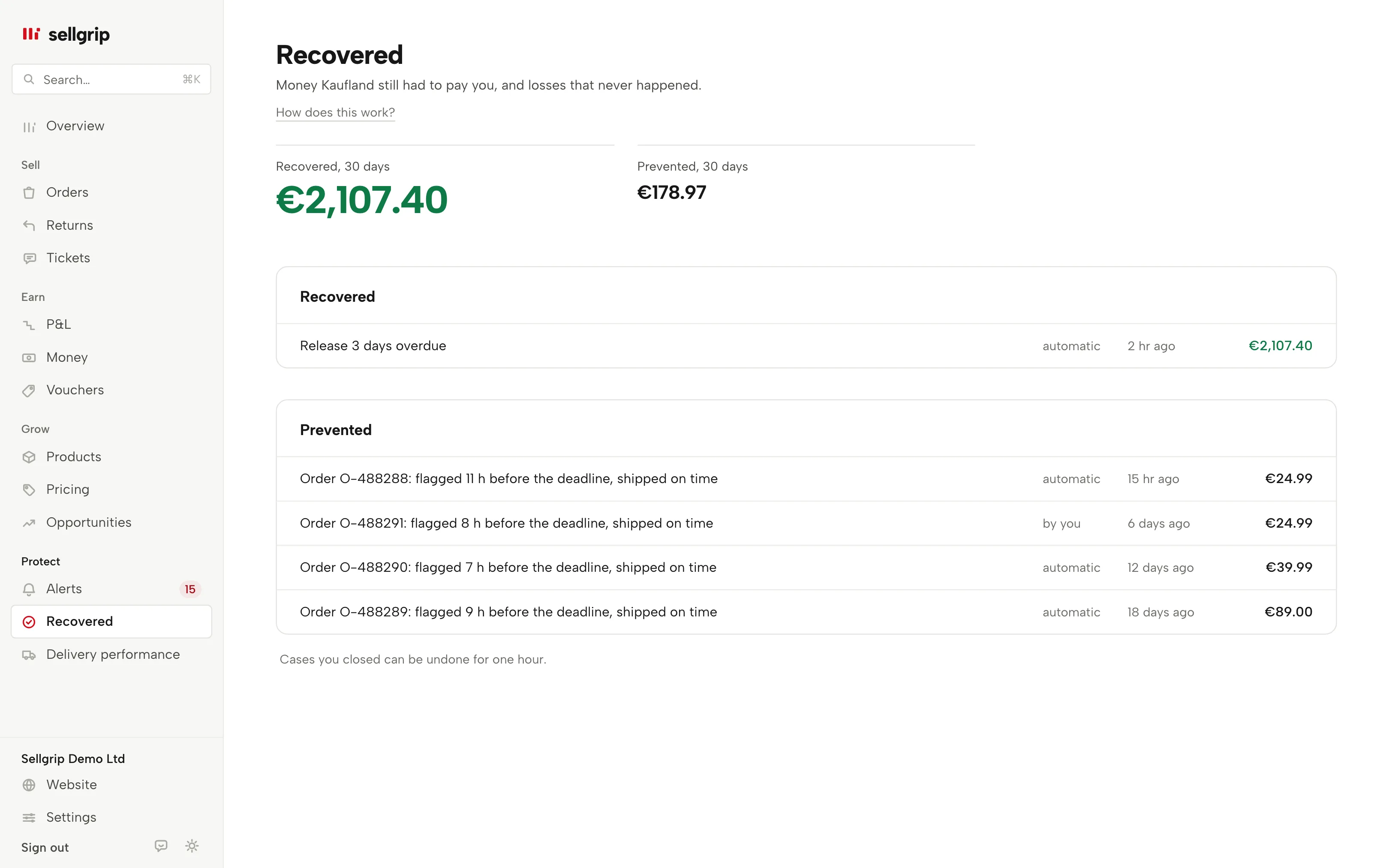
At the top: “Recovered, 30 days” and “Prevented, 30 days”. The two stay separate. You see both totals on every plan.
One receipt per case
Each receipt names the case, who closed it, when and the amount. Click it to open the order, ticket or payout behind it. The list shows the newest receipts, with the total count beside it.
Automatic or by you
A receipt marked “automatic” is a case whose cause was gone at the next sync. One marked “by you” is a case you marked as done.
Recovered
Money Kaufland still had to pay you and has paid since: an overdue release that has come in. Only these amounts are shown in green.
Prevented
A loss that did not happen, such as an order shipped before its deadline after Sellgrip flagged it. Real money, but nobody paid it back, so it is listed apart.
One hour to take it back
A receipt you booked yourself can be taken back for an hour. The amount then leaves Recovered and the case is open again.
How an amount gets into Recovered
-
Sellgrip flags a case
It appears in Alerts with its amount, such as a missing release from Kaufland.
-
The case gets closed
You mark it as done, or the cause is gone at the next sync. For a case with an amount, Sellgrip asks first.
-
Sellgrip books the receipt
The amount appears with its date under Recovered or Prevented. Snoozed cases book nothing, because their amount was not in the open total.
Why a receipt matters
When a release is still pending, it helps when someone follows up.
Recovered shows what that work brought in, case by case. Prevented shows the losses that did not happen. Every amount comes from the case it belongs to.
- Release after 14 or 21 days
- Kaufland releases your revenue 14 days after delivery (with a tracking number) or 21 days after the order is marked as shipped (without one). An open ticket pauses the period.
- The transfer to your bank
- You transfer released funds yourself, at any time, in the Accounting section of the Seller Portal. The payout date calculator works out the release day.
Source: Kaufland Seller University, Payment, read on 11 September 2026.
What you see in Sellgrip
- Recovered, 30 days
- Overdue releases that came in during the last 30 days, large and in green.
- Prevented, 30 days
- Losses that did not happen in the last 30 days, right beside it.
- Receipts
- Two lists, Recovered and Prevented, with one line per case: title, who closed it (“automatic” or “by you”), when and the amount. On Free and Pro, this shows what Sellgrip found and which plan includes the receipts.
- Undo
- Next to receipts you booked yourself, the “Undo” button stays for an hour. It asks once more before taking the amount back.
Questions about Recovered
Does Recovered mean Kaufland has paid?
Recovered holds overdue releases. A receipt marked “automatic” there means the payment showed up in your settlement. One marked “by you” is a case you marked as done. Prevented is not a payment: it is a loss that did not happen.
Which plan shows the receipts?
You see the totals on every plan. The individual receipts come with Business, together with the texts for Kaufland and the evidence file.
Why does a snoozed case book nothing?
A snoozed case is not part of the open total in Alerts. So when it is closed later, Sellgrip books no amount.
Can I delete a receipt?
You can take back a receipt you booked for an hour, and the case reopens. Automatic receipts stay, because the case resolved itself.
Who can take receipts back?
Only logins that are allowed to work on cases. Someone with read-only access sees the receipts without the button.
Related tools
Checked on , last updated
Start with Sellgrip today.
You can start free without a card or a contract. Want everything? Try Business for 14 days (payment details required). After that you pay for the plan you chose, plus VAT, unless you cancel first.