Sell
The shipping label, straight from the order.
Sellgrip buys GLS labels through Kaufland Shipment Solutions, one per parcel, right in the order. A label costs money, so the purchase only goes out once you tick the box.
Try Pro or Business free for 14 days, then pay monthly or yearly for the plan you chose, plus VAT, unless you cancel first.
What Sellgrip does with a label
One label per parcel, several parcels at once
You choose which items go in which parcel, up to 10 parcels per order. A parcel always belongs to exactly one order.
Measurements filled in
Sellgrip fills in the size and weight of your last parcel with the same items, else of your last parcel to that country, else of your last parcel. You only check them.
Only when you tick the box
Without the tick next to “Buy a paid label from Kaufland”, nothing goes to Kaufland. Each purchase goes out once: a second click returns the same label, not a second paid one.
Report the dispatch right away
Tick “Report the dispatch with this tracking number right after” and Sellgrip reports the order as shipped straight after the purchase. Or click “Report dispatch” next to the label later.
How to buy a label
-
Open the order
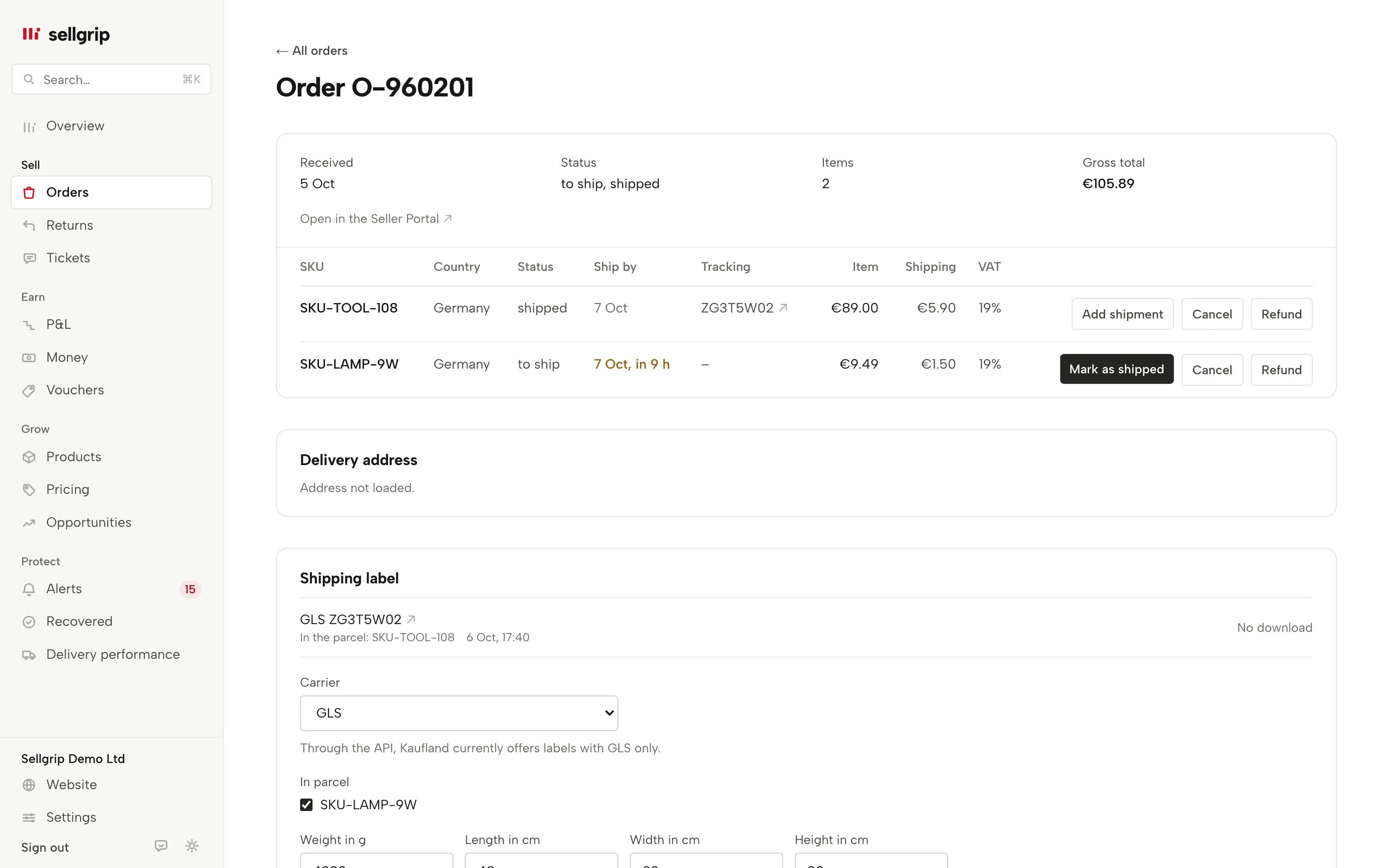
Open the order under Orders. Labels are only available for items that still need to be shipped.
-
Describe the parcels
Choose the number of parcels and which items go in each. Check the weight in grams and the length, width and height in whole centimetres, which Sellgrip fills in from your earlier parcels. Then tick the box and click “Buy label”.
-
Stick it on and report it
Download the label and stick it on the parcel. If you ticked the dispatch box, the order is already reported as shipped. Otherwise click “Report dispatch” next to the label.
Why buying and reporting are two steps
A bought label does not report the dispatch by itself: in Kaufland’s API these are two separate steps. With one tick you decide whether Sellgrip reports the dispatch straight after the purchase, with the label’s tracking number.
A label costs money, and a second purchase after an error costs money again. So Sellgrip checks the details in full beforehand and sends the purchase only once.
- GLS only
- Kaufland’s API for shipping labels names GLS as the only carrier. That is why Sellgrip offers GLS only.
- No return labels
- Kaufland’s API has no return labels. Sellgrip only buys labels for shipping to the buyer.
What you see in Sellgrip
- Shipping label
- The section in the order, with “Carrier”, “In parcel”, “Weight in g”, and length, width and height in cm. When several items still need to go out, “Parcels” is there too.
- Buy a paid label from Kaufland
- The tick before the purchase. With several parcels it names their number. If the order already has a label, it reads “Buy another paid label”.
- Download label
- Next to every bought label, with GLS, the tracking number, the items in the parcel and the time. If Kaufland provides no file, it says “No download”.
- Report dispatch
- Next to a label whose items are still open. The button reports the dispatch of those items with the label’s tracking number.
- Where size and weight come from
- Below the measurements, Sellgrip says which earlier parcel they come from, such as “Size and weight from your last parcel with the same items.”
Questions about Shipping labels
Which plan includes shipping labels?
Pro and Business. On Free, the order shows which plan includes the label.
Does Sellgrip report the dispatch when I buy a label?
Only if you tick “Report the dispatch with this tracking number right after”. Otherwise you click “Report dispatch” next to the label later.
Which carriers are available?
GLS only. Kaufland’s API for shipping labels names no other.
Can I buy return labels?
No. Kaufland’s API has no return labels.
What happens if the purchase fails?
Sellgrip does not retry on its own and shows Kaufland’s answer. That way you do not end up with a second label you did not want.
Can I buy labels for several parcels?
Yes, up to 10 per order in one go. You choose which items go in which parcel. Each parcel gets its own label with its own tracking number.
Related tools
- The Kaufland Seller Portal explained, step by step Guide
- Orders Sellgrip tool
Last updated
Start with Sellgrip today.
You can start free without a card or a contract. Want everything? Try Business for 14 days (payment details required). After that you pay for the plan you chose, plus VAT, unless you cancel first.